
Explore this service
Tell us what you want to see
Send a few photos of the outside of the home, where your router sits, and the cameras if you have bought them. We reply with suggested positions and a firm installation price.
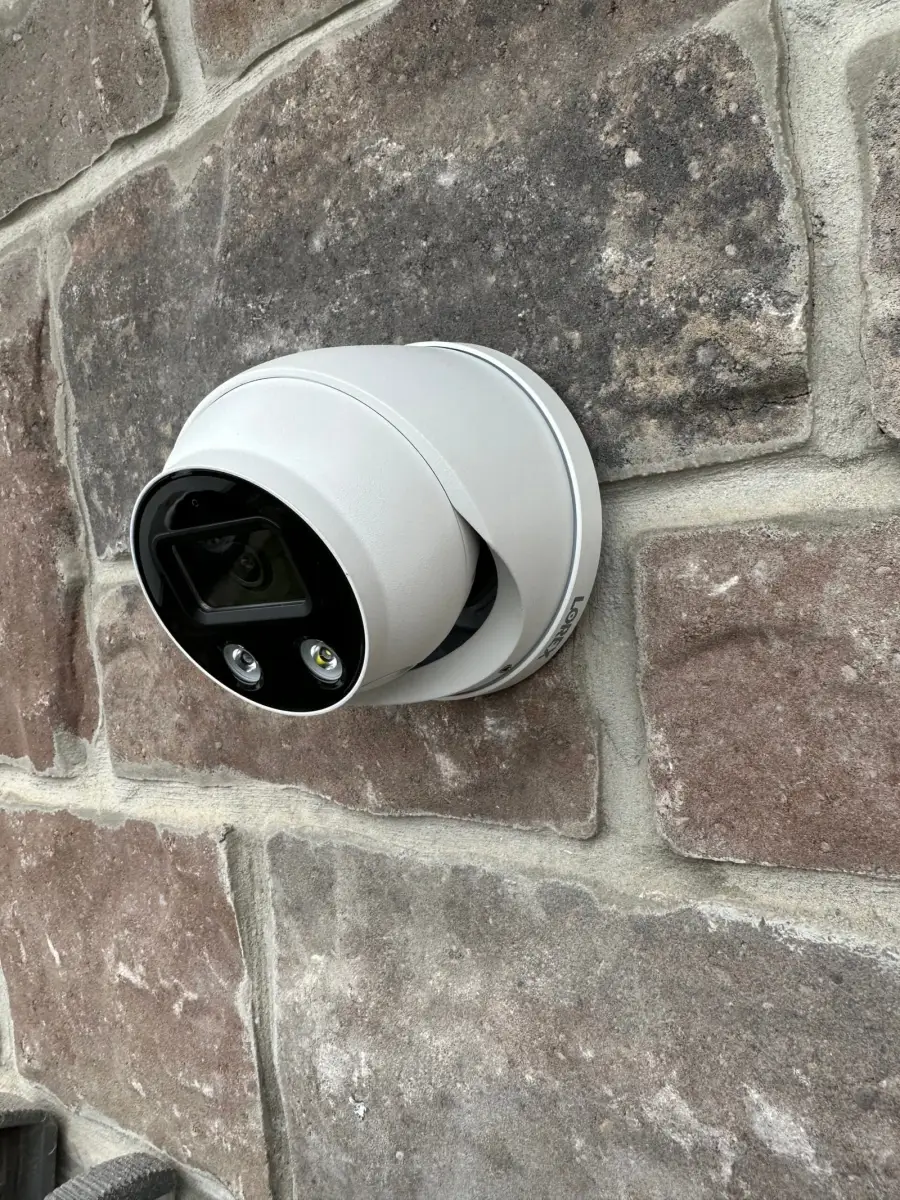
A dome camera on a stone wall
A real installation: a white dome camera fixed to a stone exterior. Stone and brick need masonry anchors and a sealed cable entry so water does not follow the wire into the wall. Dome cameras are harder to knock out of aim than bullet cameras, which makes them a good fit under a low soffit or near a door.
Where to place cameras around a house
Adding cameras does not always add coverage. Four cameras aimed at doors, the driveway and the side gate usually show more than eight aimed at open lawn.
Every ground-floor entry
Front door, back door, patio slider and the side door to the garage. Aim to catch a face at head height, not the top of a hat.
The driveway
One wide view of the cars, plus, if you want plates, a second camera aimed tighter at the end of the driveway where vehicles slow down.
Side yards and gates
The paths between houses are where people walk in unseen. A camera covering the gate often matters more than one on the backyard.
Height and reach
About eight to ten feet up is a good balance: out of easy reach, but low enough for a usable face. Higher mounts see more ground and less detail.
Light and glare
Avoid aiming straight into a street light or the setting sun, and keep the camera's own infrared clear of soffits and walls that bounce it back.
Your neighbours
Point cameras at your own property and the approach to it, not into a neighbour's windows or backyard. Most cameras let you mask out part of the view, and we set that up where a view crosses a neighbour's lot.
Video doorbells
A video doorbell is usually the first camera people add, because it covers parcels and visitors in one device. Wired doorbells use the low-voltage wiring and chime you already have; we check the transformer can power the new doorbell and fit the adapter the maker supplies. If the old transformer is too weak and has to be replaced at the electrical panel, that is work for an electrician, and we will tell you before starting.
Battery doorbells skip the wiring and need charging every so often. Either way, we mount it at a height that sees a face and a parcel on the mat, angle it with a wedge if the door is recessed, and test the chime and the phone alert.
What to have ready on install day
- 1
Wi-Fi name and password
Every system needs your network, even wired ones, to send alerts and the app view. Check the signal where wireless cameras will go before we arrive.
- 2
A spot for the recorder
Wired systems need the NVR near your router with power and ventilation: a utility room, a closet or a basement shelf, not inside a sealed cabinet.
- 3
Attic or basement access
Cable runs usually go through the attic or along basement joists. Clear the access hatch and anything stored in front of it.
- 4
Your phone and app account
Have the phone that will own the system on hand so we can set up the app, add other users and walk you through playback.
Monitoring, alarms and the work we leave to others
We install and set up cameras and doorbells. We do not monitor them. If you want a monitored alarm that calls a response centre, that service is arranged with a monitoring provider, and we can install compatible hardware for it. We also do not recommend or resell a particular brand here: bring the system you have chosen, or tell us your budget and needs and we will explain the trade-offs between the types.
Many homes are brick or stone at the front and siding at the back, so a single job can need two kinds of fixings. Soffit and attic access can make cable runs more straightforward. Where an outside run is needed, we discuss the route and conduit with you before installation.
Your questions, answered
Before you book
How much does security camera installation cost in the GTA?
It is priced by the job: the number of cameras, how far each cable run goes, and the wall materials. Send photos and the camera count and we will give you a firm price.
Do you supply the cameras?
Tell us what you have or what you are considering. We install systems you have bought, and we can talk through wired versus wireless options before you buy so the hardware suits the house.
Is a wired or wireless camera system better for a house?
For four or more cameras on a detached home, wired PoE with a recorder is usually more reliable because nothing depends on batteries or Wi-Fi signal. For one or two cameras, a condo or a rental, wireless is simpler.
Can you install a video doorbell where I have an old wired doorbell?
Usually yes. We check the existing transformer and chime and fit the adapter the doorbell maker supplies. If the transformer needs replacing at the panel, that part needs an electrician and we will say so up front.
Can I point a camera at the street or my neighbour's yard?
Aim cameras at your own property and the approach to it. As a courtesy, avoid pointing into neighbours' windows or yards; most systems let you black out part of the picture, and we set up those privacy masks during installation.
Do you offer alarm monitoring?
No. Monitored alarm service is arranged with a monitoring provider. We install and set up the cameras, doorbells and alarm hardware.
Can you install cameras at a business?
Yes. Offices and shops follow the same planning: entries, the cash area if there is one, and the parking lot. Send photos and the number of cameras for a quote.